

Every day, people and organizations run into obstacles with the same starting point: "I want to..." or "We need to..." Turning that intent into a working Drupal AI workflow—without weeks of custom code—is easier than you might think.
To put that to the test, I set out to build something that sounds daunting at first glance: a personal, AI-powered job search engine inside Drupal, with minimal-to-no custom coding. Not just a list of links, either. A complete system that pulls live job listings, scrapes the full posting details, evaluates them against a CV using AI, explains why a job is a good fit, and keeps a human in the loop to make the final call.
Combining Drupal Feeds, ECA, the Tool API, and Maestro makes that kind of end-to-end orchestration surprisingly straightforward. That build is the focus of this post.
The Goal (and the Technical Hurdle)
To make this personal job search engine useful, it needed to handle a few key requirements:
- Pull from a freely available source of job listings (in this case, the Government of Canada Job Bank, filtered to Ontario. Over 11,000 postings).
- Import those listings locally into Drupal.
- Fetch the full job posting details for each listing.
- Compare every job against my CV using AI and explain why it matched.
- Save both the matches and the rejections so nothing is lost, and track which jobs I want to pursue.
Getting the initial list is easy because the Job Bank provides an RSS feed. However, an RSS feed only gives you a summary and a URL, not the actual job description, pay rate, or requirements. As a human, you have to click through each listing to read the details. Automating that "click through" step without writing a monolithic custom script is the main technical hurdle we need to solve.
Pulling the Data In with Drupal Feeds
First, we set up three simple Content Types in Drupal: Job List Entry (to hold the RSS summary and the link to the full posting), Job Post (to hold the full job details), and CV (a single long-text field holding my resume).
From there, we use Drupal's Feeds module to create two separate importers:
- The Job Listing Feed: Uses the standard RSS/Atom parser to pull listings from the Government of Canada Job Bank feed into Job List Entry nodes.
- The Job Posting Feed: Many people think Feeds is only for CSVs or RSS, but its XML parser works great on structured HTML web pages too. Using XPath queries, this feed targets the structured elements of an individual Job Bank page and maps fields like title, location, pay, start date, employer, and full job description directly into a Job Post node.
Now we have a way to import the list and a way to parse a single job page. We just need to connect the two automatically.
Event-Driven Orchestration with ECA and Tools
This is where ECA (Events, Conditions, Actions) comes in. ECA is built to react immediately to Drupal events, making it the ideal glue between our data import and our workflow engine.
Our ECA model has two simple sequences:
1. Bridging the "Click Through" Gap
Whenever Feeds saves a new Job List Entry node, ECA fires immediately. It grabs the URL from the field_link_to_job_posting field, loads our Job Posting Feed entity, and triggers a custom ECA action (ECA Feeds: Start a Feed). By passing that URL dynamically as the feed's source, either inline or in a background queue, Drupal automatically "clicks through" and imports the full Job Post node.
2. Launching Maestro via the Tool API
The second sequence fires whenever a new Job Post node is saved. Instead of trying to manage AI evaluation and human approvals inside ECA, ECA hands control over to Maestro using a Tool call.
Because Maestro exposes public workflows through Drupal's Tool ecosystem, ECA can launch our Job Post Validation workflow without any bridging code and without knowing anything about Maestro's internals. It simply passes the new job posting's node ID into the workflow as an input variable. ECA talks to Maestro, Maestro talks to ECA, and both can talk to FlowDrop or external MCP servers just as easily through Tools.
AI Evaluation and Human-in-the-Loop Review in Maestro
Once ECA starts the Job Post Validation workflow, Maestro takes over durable state management, AI reasoning, and human routing:
- Dynamic Setup: In parallel, Maestro converts the
job_posting_idandcv_entity_idinto Maestro Entity Identifiers. It pulls the job title to dynamically rename the running workflow process (so the user sees the actual job title rather than a generic workflow name), and looks up the owner of the CV to assign them as the workflow'sinitiator. Even though the demo defaults to my CV node ID, any user's CV can be passed in dynamically. - AI Evaluation: Next, the Maestro AI task passes both the rendered CV and the rendered Job Post to an LLM configured as a "fair and balanced job recruiting agent." The prompt instructs the AI to evaluate transferable skills, not just exact keyword matches, and return either a single dash (
-) if there is no match, or a detailed explanation of why the candidate fits the role. That response is saved into ajob_match_reasonvariable. - Deterministic Branching: A Maestro
IFtask checksjob_match_reason. If it equals-, the workflow flags the job as AI-rejected and ends. If it contains an explanation, Maestro routes the posting to a human-executable Content Type Task assigned dynamically to theinitiator. - Human Decision: When the user reviews the job, Maestro decorates the node view with Will Apply and Complete Review and Not Interested buttons. Clicking either completes the task, flags the outcome accordingly, and finishes the workflow.
Going Beyond the Default Task Console
Maestro ships with a built-in Task Console that handles most of the workflow use cases out of the box. You can see your assigned tasks, inspect attached entities, and execute reviews right away.
For a job search engine, though, you want to see the whole picture, not just what's waiting for your review, but what AI is currently evaluating, what it rejected, and which jobs you've already decided to apply for or pass on.
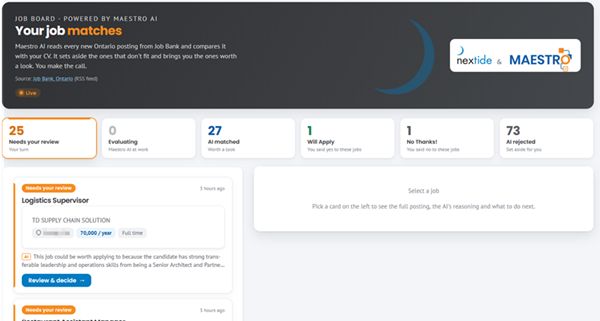
Because Maestro is fully Views-enabled, we replaced the default Task Console view with a custom Job Board built with Layout Builder, Views, and a bit of lightweight JavaScript. The board gives you six live-updating buckets:
- Needs your review
- Evaluating (watching Maestro and AI process jobs in real time)
- AI matched
- Will Apply
- No Thanks!
- AI rejected
In a live test importing 100 jobs, 73 were automatically filtered out as poor fits (like Carpenter, Maintenance Millwright, or Mouldmaking Machinist), while 27 surfaced for my review, complete with the AI's reasoning for why my background aligned with roles like Data Analyst or Sales Associate.
Better yet, nothing is thrown away. Over time, those saved decisions become a hive of knowledge: AI could analyze the jobs you manually passed on to refine future prompts dynamically, or compare your CV against rejected roles you actually wanted to suggest targeted resume improvements.
Video: Personal Job Search Engine Walkthrough
In the video below, I walk through the entire end-to-end build and run a live 100-job import to watch the orchestration in action. You'll see:
- How to structure Content Types and configure Feeds with XPath to parse external job postings.
- How ECA bridges the RSS listing to the full job posting import and launches Maestro via the Tool API.
- How the Job Post Validation template uses Maestro variables, entity identifiers, AI evaluation, and human-in-the-loop review tasks.
- How Maestro Views power a custom, real-time Job Board UI.
The Takeaway
With Drupal, what looks like a complex, custom-coded project comes together cleanly when each tool handles what it does best. Feeds brings external data in, ECA reacts to events in real time, the Tool API connects subsystems without brittle glue code, and Maestro handles the durable, stateful orchestration across AI and human review.
If you have an operational intent that feels impossible to automate, chances are you can orchestrate it in Drupal, deterministically, transparently, and with humans firmly in control.
Is this a real solution?
Yes, I really did build this. I demonstrated a stripped-down version of this at the Southwestern Ontario Drupal Camp in October 2026 as well. This is well and truly a real application. Now, is it scalable as-is? No. There's many things that you'd do differently when creating a scalable solution.
If you wanted to make this a multi-user job board, you wouldn't compare each and every job injected into the system to each and every CV in the system. You would take a more streamlined approach, first doing vector comparisons between CVs and jobs and then only running full-blown comparisons to the top x jobs that match. Vector comparisons, while not using costly chatbot tokens, still uses LLM embeddings and suggests a more complex environment to house this application.
It's also very likely that you will not fire off a Maestro workflow for each and every job posting. There's simply no need to. Likewise, you wouldn't run ECA imports of the Job Post details import feed inline. It's highly likely that you'd queue those up to run at a later date. However, if you're importing thousands of jobs a day, your import queue will become extremely bloated. Again, building a scalable solution from something like this takes time and expertise to navigate. That's why Nextide exists!
